


Feature Library
Short how-to videos for your Butler Robotics system, organized by feature.
Featured tutorials

Align the next quilt row
Use Nesting to line up the next row with the one you already stitched.

Crop around a tote monogram
Leave a monogram or appliqué clear while quilting the background.
Browse by feature
Layout & Stitching
- Nesting
- Edge-to-Edge
- Borders
- Channel Locks & Basting
- Point to Point
- Quilt Layout Guide
- Saving & Reopening Layouts
Editing Tools
Stitch Control
Patterns & Files
Browse guides
- Getting Started
Setting up a new quilt, saving a layout, and getting to know the Amethyst model.
- Custom Quilting
Block-by-block and area-by-area quilting with the Butler.
- Projects & Inspiration
Quilts, bags, apparel, quilt-alongs and behind-the-scenes tours.
- Maintenance & Care
Keep your Butler and long arm running well.
Latest tutorials
- Quilt/Project Review · 24:05
A review of recently finished quilts and projects, including custom-quilted pieces done point by point, a Fourth of July quilt that stacked nicely with Nesting, and a quilt with front and back both coordinated. A good look at the range of results possible with the robotic system.
- Duffle Bag Project · 12:41
Quilts the main body of a duffel bag project with dense bubble-style quilting for structure. Turns on the proportion lock and uses Auto Scale to fit ovals, uses a sharp needle for the thicker layers, and stitches out the first row. Suggested for tote, bag or purse projects where the quilting needs to hold shape.
- Edge to Edge Bonus Project · 10:21
Quilts a small bonus project from leftover fabric using an edge-to-edge design. Sets the layout about a quarter inch outside the quilt edge, uses Repeat and Auto Scale to fit the design, and adjusts stitching speed (20 is the default; around 30 is typical for an average project).
- Margins & Centering Without Autoscale · 10:56
Gets the same result as the Margins feature without it. Takes the half-inch margin off the design's size on each side, sets the size manually in Scale, and then uses the vertical and horizontal centering buttons in Move to center it in the layout box. Shows the math and why the margin ends up even all the way around.
- Custom Quilting, Pattern Tags & Margins · 17:43
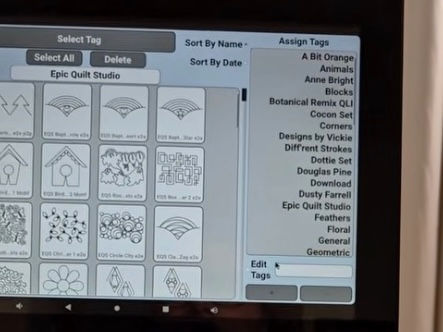
Prepares for custom block quilting by organizing pattern tags. Uses Edit Tags (a mouse helps) to create a new tag, selects multiple patterns at once with multi-select to add them to it, and then sets a margin so Auto Scale fits the design inside each block with a gap around the edges.
- Cleaning & Maintenance · 17:36
A cleaning and maintenance day for the long arm and robotic system. Covers dusting the table, frame and wheels, removing thread and fuzz between quilts, checking that connector plugs haven't jiggled loose, and dusting the automatic voltage regulator. Recommends a regular maintenance schedule.